
Search Phrase = Instructional
This page is part of the JV partner and distributor on-boarding process. This is the redirect link from the Instructional Email Sequence in Infusionsoft
The Affiliate Center is a password-protected portal that you can use to access your sales reports, redirect links, and acquire marketing resources that is provide for you in the form of Banners, Email Templates or Web Pages. The Affiliate Center will give you easy access to the tools and information they you'll to pile up those commissions!
If you haven't logged in yet to your affiliate account, follow these simple steps:
1. Access the Instructional email we sent you with your login information. You should receive this email once you have completed our opt-in form with your name and email address. This email will contain your ID, Password and Referral Code which you should keep secure at all times so you don't lose access to your account.
2. Access the Affiliate Center Login in Page.

3. Just enter your login information, click the login button, and you're in!
There are three menu categories in the Affiliate Center: Home, Resources, and Reports.

In the Home section you can access your profile to update you contact information including email, phone number, address and the name of your company. You can also access the programs tab to see what commission programs you are included in and see what the products you can sell and what your commission setup is with those programs. Lastly, your commission structure can be viewed on the last tab

The resources section is where the magic happens. This is where you get the tools you need for promoting our digital products.
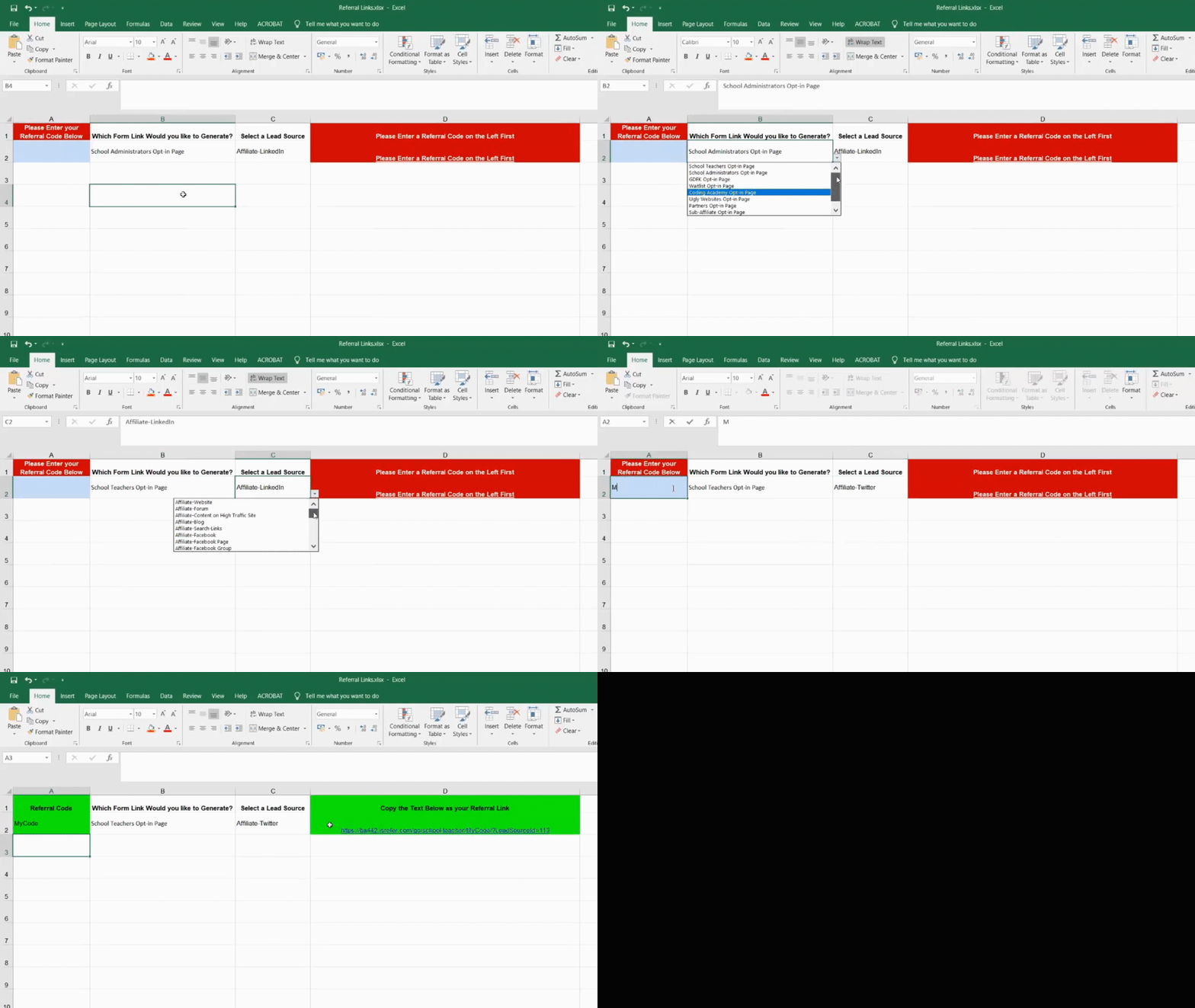
You'll need to copy and paste the links in the last column and send that to the person you want to sell to. As simple as that. That will redirect them to the Webform you have selected
Important Note: Use only these links, they are provided specifically for you. Not doing so may result in you not getting your commission.
TIP: You can use the link to wrap a button or a clickable place a page or app!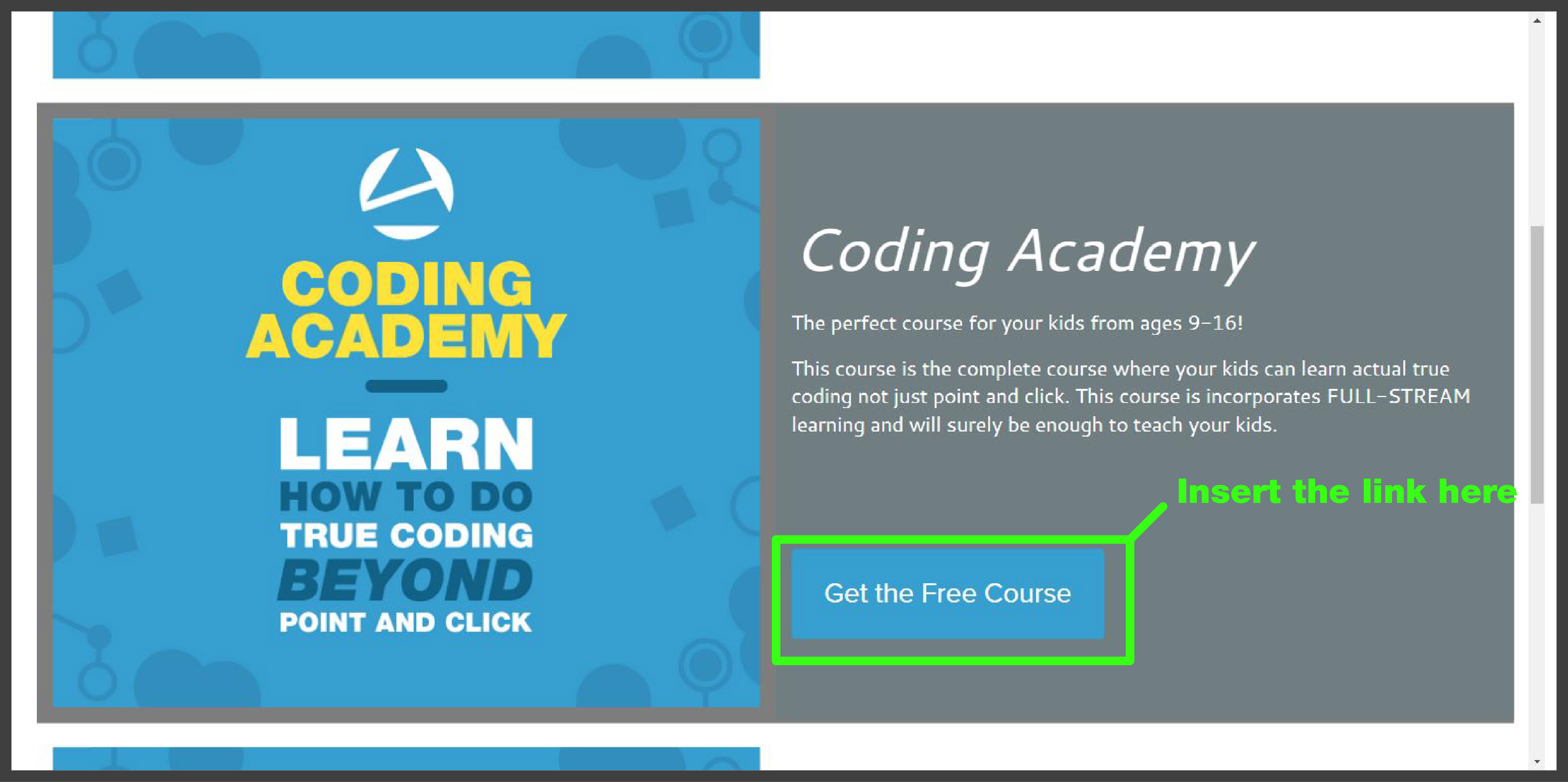

The Reports section gives you access to commission, lead tracking, and sales reports. The My Ledger report will be a valuable tool you can use to access your financial earnings.
Anomaly Studios Done for you Services
Launching a product or service can be tough. You totally could implement each core piece of your marketing strategy directly into Anomaly AMP, leveraging our powerful marketing funnels, landing pages, website and blog tools, and online membership and sales features. But even with all those resources, attracting customers, and keeping up with the pace of content development and advertising implementation can feel like a real challenge.
We've been there. We understand the struggle. That's why my team is ready to help you build a solid foundation for growth. We'll partner with you to develop compelling pre-launch content, cultivate a targeted audience, and help you create a successful seed launch, setting you up for scalable success.

(view in landscape on mobile to see the stages in detail)
 Here is a PDF download of your Success Path that you can print and put on your wall. This is our growth framework.These are the five phases of growth and this will help you see the big view. This is how the Anomaly Studios team can help you grow—strategically and systematically.
The Deliverables section at the bottom of the printout above shows each key step or deliverable in the growth sequence. Each phase has 3-5 action steps. Once completed we move on to the next phase and unlock increasing levels of growth. We figured this all out the hard way and now you get to benefit from the streamlined steps in our growth framework.

(view in landscape on mobile to see the stages in detail)
The PDF download above outlines a phased approach with detailed sprints and tasks to efficiently develop, launch, and scale the product offering. The PDF printout is organized in five phases from left to right. It includes deliverables such as an onboarding process to define the vision, business analytics and market research to validate the positioning, testing of marketing models and lead magnets, a pre-launch offer with revenue automation, and the final development of an optimized evergreen sales funnel. When we meet we can create the statement of work and define the roles and responsibilities ensure a collaborative and streamlined process. Each number and deliverable in teal is a key step or deliverable in the process to build sustainable and ongoing growth and traffic.
It’s important to know that you are working with the best when you work with Anomaly Studios. Our team is composed of award-winning designers, content strategists, video editors, traffic strategists, and more to help you bring your product to life and to market at whatever level you need us. Several of our project leads have one or more graduate degrees specifically in this space.
For example Ryun who took his own YouYube channel to 1.5 MM subscribers and over a billion views on youTube.
Or Nick, an award-winning Instructional designer and writer who has crafted world-class content and educational experiences for some of the world’s top universities.
Claire is one of our visual designers who helps your products and user experience look amazing.
Shara is our data wizard that helps you architect your traffic channels and affiliate partners research.
And you can work directly with me as your launch strategist and team leader to help orchestrate the team to make it all come to life.
These are just a few of my team you can work with.

How big do you want to go?
How fast do you want to grow?
Where do you fall on the DIY to done-for-you spectrum?
After you have thought about the three questions above, Schedule a Meeting with my Zoom meeting calendar integration at a time that works for you or email me at joshua@anomalystudios.com.
If you would like to invite others to the Zoom meeting simply add them (shown below). Everyone can align their calendars with the invites that are sent out from my Calendar Hero integrations.

Keywords: Content,creation,workflow,time-saving,high-quality,student,outcomes,audio,file,screen,recording,Camtasia,OBS,generative,AI,digital,double,course,matrix,Instructional,design,Otter,PowerPoint,slides
Josh Lomelino's ultimate content creation workflow is designed to dramatically reduce course development time from months to weeks or days by leveraging various content generation methods. His approach ranges from simple audio-only techniques to fully automated workflows using generative AI, with a focus on delivering clear, measurable learning outcomes. The workflow encompasses four progressive methods, starting with basic audio creation and advancing to complex AI-driven content generation that can produce digital avatars, slides, and video content from simple text prompts. By providing a flexible, scalable approach, Lomelino enables content creators to efficiently develop high-quality online courses and educational materials.
Josh Lomelino's ultimate content creation workflow is designed to dramatically reduce course development time from months to weeks or days by leveraging various content generation methods. His approach ranges from simple audio-only techniques to fully automated workflows using generative AI, with a focus on delivering clear, measurable learning outcomes. The workflow encompasses four progressive methods, starting with basic audio creation and advancing to complex AI-driven content generation that can produce digital avatars, slides, and video content from simple text prompts. By providing a flexible, scalable approach, Lomelino enables content creators to efficiently develop high-quality online courses and educational materials.
After this demo, learners will be able to:
Understand the Four Methods of Content Creation
Differentiate between audio-only, screen recording, webcam, and fully automated content generation techniques
Recognize the strengths and limitations of each workflow method
Develop Efficient Content Generation Skills
Apply AI tools like Otter AI, Claude AI, and ChatGPT for script drafting and refinement
Create high-quality educational content using streamlined workflows
Leverage AI Technologies for Course Development
Utilize generative AI platforms for audio, video, and slide creation
Transform content development timelines from months to weeks
Design Learner-Centered Educational Content
Craft clear, measurable learning outcomes
Develop Instructional materials that focus on practical skills and immediate application
Implement Scalable Content Production Strategies
Overview of Content Creation Workflow 0:09
Josh Lomelino introduces the ultimate content creation workflow class, aiming to reduce course development time from months to weeks or days.
The course will cover a blend of simple to fully automated workflows, starting with simpler methods for quick wins and progressing to advanced approaches.
Emphasis is placed on delivering clear, measurable outcomes and setting up necessary systems from the start.
The course will cover creating basic audio files, screen recording using tools like Camtasia or OBS, and fully automated workflows using generative AI.
Methods of Content Creation 1:30
Josh Lomelino outlines four methods of content creation, ranging from simple to fully automated, with each method providing a different level of complexity and automation.
Method one involves creating audio-only content using tools like Claude AI or ChatGPT to refine scripts and generate final audio files.
Method two involves real-time screen recording using software like Camtasia, capturing both screen content and voice simultaneously.
Method three combines screen recording with live webcam footage, allowing for a more dynamic on-screen presence.
Method four uses AI to generate a digital double video from a recorded vocal track, with AI also generating PowerPoint or Canvas slides.
Detailed Explanation of Methods 2:49
Method one: Josh explains the process of refining raw text into final audio scripts using AI tools and recording the final audio file manually or with AI.
Method two: Josh describes using Camtasia to record both screen and voice simultaneously, minimizing post-production work and suitable for relaxed, adaptable work.
Method three: Josh details recording both screen and webcam footage in one take, requiring careful setup for a consistent on-camera presence.
Method four: Josh explains using AI to generate a digital double video from a recorded vocal track, with AI also generating slides synchronized to the transcript.
Implementation and Integration 10:04
Josh emphasizes the importance of starting with method one and progressing sequentially to method four, explaining the workflows and specific tools used to optimize the process.
The course is designed to provide strategies that can be implemented immediately, with each method providing a different level of automation and complexity.
Josh will demonstrate how to generate scripts, auto-generate audio files, and record both audio and video manually, as well as how to automatically generate PowerPoint and Canvas slides using AI.
The final video will show how to integrate these workflows into Anomaly AMP, providing learners with contextual information and a timeline breakdown.
Keywords: Overview, Demo, Audio, Recording, Process, Tracks, Methods, Production, Manual, AI, Generated, Voices, Automatically, Instructional, Aid, Synthesizing, Information, Guide, Instruct, Persuade, Sales, Potential, Catalyst, Automating, Content, Creation, Recorded, Serve, Presentation, Slides, PowerPoint, Canva, Animated, Effects, Virtual, Camera, Overlay, Automated, Execute, Fundamentals, Vocal, Performance, Techniques, Apply, Screen, Captures, Principles
This video provides a comprehensive overview of audio production techniques, teaching viewers how to create powerful audio tracks through manual recording and AI-generated voices. Participants will learn to leverage audio as a versatile tool for Instructional content, sales support, and multimedia creation, including automated slide generation and virtual presentations. The demonstration will equip learners with fundamental vocal performance skills applicable to screen captures, on-camera presentations, and various content creation scenarios. By mastering these techniques, viewers can transform their approach to creating engaging, professional-quality audio and visual content.
This video provides a comprehensive overview of audio production techniques, teaching viewers how to create powerful audio tracks through manual recording and AI-generated voices. Participants will learn to leverage audio as a versatile tool for Instructional content, sales support, and multimedia creation, including automated slide generation and virtual presentations. The demonstration will equip learners with fundamental vocal performance skills applicable to screen captures, on-camera presentations, and various content creation scenarios. By mastering these techniques, viewers can transform their approach to creating engaging, professional-quality audio and visual content.
Here are the key things you will be able to do after you watch this demo:
Record high-quality audio tracks manually
Generate AI-powered voice narrations from text scripts
Use audio as an Instructional and persuasive communication tool
Automate presentation slide creation using audio tracks
Create virtual on-camera presentations with overlaid audio
Apply vocal performance techniques to screen captures
Synthesize information effectively through audio narration
Leverage audio for sales and Instructional content development
Transform text scripts into multimedia presentations
Develop professional-grade content using both manual and AI-driven audio production methods
Overview of Audio Recording Process 0:08
Josh Lomelino introduces the demo, focusing on the process of recording audio tracks.
He mentions that the overview video will demonstrate two methods for audio production: manual recording and AI-generated voices.
The video aims to outline various uses of audio, emphasizing its role as an Instructional aid and its potential in automating content creation.
Josh highlights that audio can synthesize information to guide, instruct, persuade, and support sales.
Applications of Audio in Content Creation 0:51
Josh explains that audio tracks can be used directly as Instructional aids, providing guidance and support.
He elaborates on audio's role in automating multiple aspects of content creation, whether recorded manually or generated with AI.
An audio track can create presentation slides in applications like PowerPoint or Canva, complete with animated effects.
The audio can also be used to generate virtual on-camera presentations that overlay on automated slides.
Upcoming Demos and Techniques 1:40
Josh mentions that upcoming demos will show how to execute both methods of audio production: manual recording and AI-generated voice production.
He emphasizes the importance of mastering the fundamentals of delivering a strong vocal performance.
These techniques can be applied to various areas, including live screen captures and on-camera presentations.
Josh concludes the high-level overview, stating that he will see the audience in the next video.
Partner Center Tour
The Affiliate Center is a password-protected portal that you can use to access your sales reports, redirect links, and acquire marketing resources that is provide for you in the form of Banners, Email Templates or Web Pages. The Affiliate Center will give you easy access to the tools and information they you'll to pile up those commissions!
If you haven't logged in yet to your affiliate account, follow these simple steps:
1. Access the Instructional email we sent you with your login information. You should receive this email once you have completed our opt-in form with your name and email address. This email will contain your ID, Password and Referral Code which you should keep secure at all times so you don't lose access to your account.
2. Access the Affiliate Center Login in Page.

3. Just enter your login information, click the login button, and you're in!
There are three menu categories in the Affiliate Center: Home, Resources, and Reports.

In the Home section you can access your profile to update you contact information including email, phone number, address and the name of your company. You can also access the programs tab to see what commission programs you are included in and see what the products you can sell and what your commission setup is with those programs. Lastly, your commission structure can be viewed on the last tab

The resources section is where the magic happens. This is where you get the tools you need for promoting our digital products.

Important Note: Use only these links, they are provided specifically for you. Not doing so may result in you not getting your commission.
TIP: You can use the link to wrap a button or a clickable place a page or app!

The Reports section gives you access to commission, lead tracking, and sales reports. The My Ledger report will be a valuable tool you can use to access your financial earnings.
There are no Main Site search results.